


 MOD MRZ


Head office
Aktif Bilgi İşlem San. Tic. Ltd. Şti.
Çağlayan Mah. 2039/1 Sk. Bal Plaza K:4 D:9
Muratpaşa / ANTALYA
Antalya Corporate Tax Office / 0420018958


Front office, reservations, channel management, accounting, stock, POS and e-invoicing — one fully integrated solution.
Low cost, High performance
Gaining the benefit from features of latest technologies
Over the years, working with qualified high-level personnel, our company provides professional services 7/24
The more important thing is not to Sale, but after Sale to do Support as a base
Being the first software company for hotels in Turkey and reflecting the professionalism of work of our company
30 years of knowledge and experience
Instant Implementation of Technological Innovations and Improvements, constant update of used components
All questions of Back Office & Front Office Client negotiated only with one firm, Absence of problem with integration
Enterprice-Specific Solutions
Meet a fully integrated architecture that keeps data flowing seamlessly between departments. Choose the modules you need and leave the complex processes to MOD.
Individual and group reservations, check-in/out, allotments and stop sales, housekeeping and night audit on one screen.
12 topics Accounting · Stock & Cost · Payrolle-Ledger compliant vouchers, automatic postings, recipe and cost tracking, time sheets and attendance.
21 topics Restaurant and bar salesTouch POS and wireless handhelds; orders print automatically on kitchen and bar printers.
1 topic Event Order, SPA, A'la CarteBanquets and events, SPA booking with automatic therapist assignment and A'la Carte reservations in 4 languages.
3 topics Ready-made integrationsPBX, PayTV, door locks, minibar, attendance systems, passport readers, channel managers and ERP software.
1 topic CRM & operations trackingFault and request tracking, e-mail/SMS alerts, vehicle tracking and call center processes.
1 topic Online sales channelsCommission-free web booking; rates and availability to Booking.com, Expedia, HotelBeds, Agoda and dozens more from one panel.
2 topics Reports in your pocketInstant access to occupancy, forecast, revenue and department reports wherever you are.
1 topicIn this section you can fulfill Individual and Group reservations. In reservation process after will be fulfilled the entering of Client name and surname, on the same screen you can look through whether there is a Repeat, information about previous staying of guest, personal wishes and complaints together with blacklist options. In open reservations, on the day of entry, besides of rate options, you can set the currency of desired date. With the PM folio application, you can collect the whole bill of group in one folio and due to it can fulfill a printout the bill of group. Due to message at Check-In, message at Check-Out, H / K message and Post-it application, no detail could not slip away from the eyes of user.
At the enter of reservation, you can trace the Quota, Sell more tickets than there are seats, get the warning of Stop Sales, or you can enter reservation as Confirmed or in Waiting. Due to Reservation and Registration Type of Room, in the moment of reservation you can trace a difference between the type of room, which has been reserved and which was given to guest. Looking at the entered agreements, price discounts (E / B, Promotions, Brochures, Kickback, etc.) automatically throws over within the authorities, if the user will want he can interfere in discounts, can set the price, or between the dates of check-in and check-out, in any desired day he can set the desired price.
In time of reservation, you can set the room number. With feature of Super block, the sale of reserved room to another guest, will be limited within the authorities for other users. Connected with reservation the Voucher, copy of Passport, Form, e-mail and other information, in the form of file saves in the section "Documents". The entered booking form can be sent to customer by e-mail.
You can determine information of invoices and information about contacts of agencies and firms, due to the feature of grouping, looking at the market share, you can divide the firms by categories. With the option Company Master, forecast reports and statistic reports of different or the same types of companies, you can see only as one firm.
By determining only reliable companies, besides of their reservations, other reservations from unreliable firms you can enter in system only with determining the option of Self-Payment. In the section "Default", by defining some quick options with features, within the seconds you will be able to complete reservation processes.
With feature Agenda, you can save all notes of fulfilled meetings or meetings which will be fulfilled, in written and audio form. Due to section "Documents", you can store different types of documents and agreement-correspondence concerning to company.
City hotel-Boutique hotel-Resort-Holiday villages, to any of these concepts you can enter a detailed agreement in an appropriate form. For city hotels, instead of entering an agreement for each firm individually, you can connect 3-4 kinds of determined codes of agreement for the endless number of Agencies-Companies.
In this section, you can also fulfill a detailed addings of Shares, E/B-Kickbacks, Brochures, Daily discounts which are usually used for Holliday villages and Resort hotels. From here you can apply determined prices based on Check-In and Accomodation, you can set a sequences of discounts, and choose which discount with which will apply cumulatively. With feature "Price calculator", you can enter an agreements in a fast and practical form.
You can determine records of Guarantees, forecasts and quotas, in accordance with the types of rooms between the dates in the form of Agency or the Master. You can enter mass number of rooms and besides of it, you can divide into Single, Double, Triple, looking at the types of beds.
Stop Sales: with this application, you can stop sales, looking at the code Only of one Agency, Type of Room, Currency or Market. When you create a reservation, and when you select appropriate dates, the system automatically gives a warning.
Breakdown: You can determine the difference of pension between the dates on Agency, on type of Pension and looking at the different types of currency's: per person or per room, as a Percentage or as a Price. In this section you can see the differences of reports: such as Rate Control, Trial Balance and Manager Report.
In this section, you can fulfill all processes of Check-In, together with the determinations of Extra folio. Due to Quick Blocking feature, you can greatly save your time. At reserved Check-Ins, on screen of receptionist will automatically appear a warning messages. At Check-In you can establish beforehand at what day, what price will be during the accommodation.
Within a short time of 1-2 seconds, you can send to program MoD all passport details of foreign customers with help of integrated passport reader. With help of button Discounts: you can apply a discount to any department , to any room, in any proportion. In accordance with the agreement, the price will automatically be assigned.
Users within the competence, can interfere in discount on price, or E/B, Kickback, Brochures. With LOG feature for selected room, from the moment of reservation and till the very end, you can trace all changes which was fulfilled by the User in the form of enter/correction/erasure. With feature Group Check-In, you can complete check-in process for a few seconds in rooms on which was put a block earlier. In intensive time to Guests will be put the Kiosk near the Reception department, or they will be given a Tablets with help of which they can make check-in processes Independently.
In this section fulfills the processes of One room Check-out or Group Check-Out. In Check-In card, entered messages about Check-Out and Post-it notes, automatically appears on the screen at the process of Check-Out. Thus, has removed the opportunity to lose sight of important notes at user.
In time of Check-Out, when paying as C/L (credit) guest bill is automatically closed, for guests with Extra balance, at closing folio, from the side of system at user will be requested with help of which process he filfilled it (Cash, Credit Card, etc.). Together with completion of Check-Out process, Invoice and Folio will be printed. Without leaving an Invoice screen, Invoice for room can be written out separately and for Extra things also. By tracing a record of 4 different folio in one room, all of them each separately, can be written out as Invoice.
Clients who are closed the bill in advance, without waiting for the queue on reception, can independently fulfill the Check-Out process with help of Kiosk or Tablet.
In this section is filled the information of Identity Card of Guest. Due to integrated reader of Passport Information, all information are automatically transferred to program and for exploiters it plays a great importance in saving time and money. Besides of it, in this section can be looked through an information related to invoice of Guest, and details of written out invoice to the Guest.
You can trace from here the previous Accomodation and Folio information, how many times he came and stayed, how many rooms, extra, and also the amount of revenue which was left. From here you can trace an information of Personal wishes and Complaints which is filled in Questionnaire. In the Documents section, you can store copies of Identity Card & Passport or correspondence related to the guest.
You can determine accounts which corresponds to plan of Monotone account. Detailed account number which is supporting up to 20 characters, can be used to determine the corresponding consolidation of Group companies.
In Account Plan, can be written out an automatic vouchers together with determined accounts of Cost and Reflection. Besides of it, from here you can determine the parameters of Budget, BA-BS, Check-Debt Document-Inventory Card-Dekont.
In this section, you can fulfill processes of Deduction-Payment-Charging from the opposite side. You can set the Voucher Number yourself, or you can select the automatic function. When choosing automatic voucher number which belongs to previous days, because of automatic issue from system of last number of voucher, and at fulfilling the conservation of vouchers at that day, the order of date/number of check do not mix.
By using the feature of closing month in Parameters, in vouchers in which the account period was closed by mistake, the processes of correction or removal will be blocked. After the sending of Electronic-Ledger records to the Ministry of Revenue Management for corresponding months, the processes of entering/correction/deleting in any form are not fulfilled.
All actions which are fulfilled in processes of Voucher, are stored in LOG. Deleted voucher can be returned back. At the entering in Voucher there are an automatic VAT division, BA-BS feature, Exchange process, and also different variants of Mod calculators. Being inside the Voucher, you can open a new or current account, and also can look in Subsidiary ledger.
This section is used for determining the Current code in Plan account for 120 guests, 320-Sellers. In this section, you can determine the company contact and invoice information, variants of work with exchange, and term of day. In time of determination, the system automatically issues the current code number, and in corresponding reports can be prepared in alphabetical order.
Current is not a separate module in program Mod. At the same module can fulfill all Accounting processes, with no need of integration. Opened Current codes can be used automatically in Stock and Personnel programs.
From the section of Revenue processes, with a single click you can make a transfer of front office revenues to accounting department. After the necessary inspections, while writing out an automatic voucher of Revenue, in determined accounts are created the records of Incomes.
Incomes transfered from the Front-Office, firstly they are transfered in accounts of control, after this when writing out an invoice, accounts of VAT and Incomes begin to work automatically. Thus, in Front-Office the debt of Active guests is traced at the account "Debt in Reception" at Accounting department.
From Accrual through the Cash Accounting, you can write out an Invoice through the processes of Accounting.
Processes of Taken and Given Voucher are working connected with Deduction Vouchers. From the Deduction processes, fulfilled on account the processes of 101-Taken Voucher and 103-Given Voucher, automatically create a record of Voucher looking at the parameters. Looking at the date of payment of the debt, you can trace lists of Taken/Given Vouchers. Besides of it, in this section you can fulfill determining of Check Dept, Dekont, Bank.
Inventory cards you can in details determine looking at the parameters of Department and Main - Sub group. Inventory Card Control Lists and Amortization Book can be taken. Revaluation and Amortization vouchers can be written out automatically.
After finishing of Budget Codes, from the section of Account Plan, determined the parameters on corresponding accounts. After the steps of Entering Budget, Planned figures will be entered per month. Realized figures are created automatically from the side of program. You can take detailed reports from the List Comparative Budget.
Daily Accounting processes are fulfilled with minimum staff in a very short time, due to integration of all modules with each other. In this section you can write out reports, such as: Voucher of Opening and Closing, Voucher of remainder of the Income, Voucher of Accounting and Front-Office Invoices, Voucher of Reflection and Costs, Voucher of Reflection of Incomes and Expenses, Voucher of Exchange Valuation, Voucher of Revaluation and Amortization, Voucher of Personnel, Store Receipt Account Auto Voucher, Voucher of Cost and Consumption, Voucher of Returns.
By writing out an invoice in MOD program, from the side of program automatically requests the information about whether there is the Buyer in the sphere of Electronic-Invoice. Without no need for any interface, invoices written out from the program, automatically will be visible in system of Personal Integrator. Through the portal of Integrator will be delivered to Buyer. Archiving of Invoice realized in cloud. Invoices that coming from portal can be Accepted/Cancelled/Rejected. With detailed authorities can determine which user, what processes will fulfill. LOG records are stored. From here can be taken a detailed reports concerning to Electronic-Invoice.
In time of processes Coming-Outgoing Electronic-Invoices, no need for that the Financial E-Signature was connected to computer. All reports can be traced only from computers to which are given the authorities.
For all people and companies who are not included in the sphere of Electronic-Invoice, writes out an Electronic-Archive Invoice. At writing out an Invoices, in case if an e-mail address is written, then the written out invoice is automatically sent to the customer's e-mail, or if customers asks an invoice in a paper form, an invoice printed out on A4 sheet and given to the client.
Electronic-Archive Invoices concerning to the month before last, tracing up to 15th date, are automatically sent from the side of integrator into the system of Ministry of Revenue Management.
Even if Financial Electronic-Signature will not be connected to computer, you can create Electronic-Archive Invoices from computers whom were given the authorities.
MOD creates a file for records of daily Wages, driven in the past through the schemas of control which envisage and correspond to standard data and format of Ministry of Revenue Management. Created file is uploaded in the integration portal Electronic-Ledger.
Create Raw file in the cloud system from the side of MOD, by queue signed, then creates a patent and sent to system of Ministry of Revenue Management. The signed patent files from the side of Ministry of Revenue Management are loaded back into the system of cloud. These processes are checked by the user automatically.
Created Patent and Electronic-Ledgers backuped in cloud within 10 years. The stored electronic documents are considered the proof according to the law.
At process of sending the Ledger, Financial Electronic-Signature must be connected to your computer.
In this section, you can determine the products through the parameters on Main Group, Top Group and Bottom Group. At Stock Cards besides of Units, VAT and Types of Material, you can add images, you can define a Fixed Discount Rate, and also you can determine the parameters of Minimum-Maximum stock level.
You can look through for all years all the cumulative actions of selected product in Stock Card menu separately, and also can compare with previous years. On contractual products you can use the feature of Fixed Price.
Due to determining the Barcode you can fulfill a quick enter of Receipt Update and Calculations. Besides of it, you can look through from one screen a selected Stock card of remained in Main depot the Units/Number and Approximate price, and also the last and the penultimate purchases of concerning product and from which seller how much was bought.
Entries such as Invoices/Waybill/Producer you can fulfill from Receipt Update. In Accounting program, opened the current account, works with Sellers integrated. Within the authorities, from the same screen you can open a New seller. Receipt Updates entered as a Credit, at the Entry of automatic voucher, processed on Current account of relating seller, and records entered as a Cash, processed on Purchasing Account. Record of products belonging to Invoice can be fulfilled in Main Depot and such products as Meat/Fish/Vegetables and Fruits directly can fulfill the exit in Main Kitchen. For these products do not need to create a Transfer voucher separately. Besides of it, in Receipt Update you can use features of Withholding (half from VAT) and one of Tax types. You can look through the fulfilled entries of Number of products into the Main Depot, state of Amount, last and penultimate purchases from Seller. At the enter of Invoice, for products which do not have a Stock card, you can determine a new card from the same screen.
With Transfer voucher you can transfer the products from the Main Depot in Departments and between Departments. The processes of Return from the Department in Main Depot are fulfilling from the same place.
Transfer Voucher, Counting and Interactive Counting Voucher, Damaged Voucher, Return Voucher, Consumption and interactive Consumption Vouchers, Demand Voucher, Order Voucher and Sales/Officer Vouchers, all these processes can be fulfilled in detailed form.
Due to Demand Voucher, all Departments can fulfill requests from the Main Depot through the computer. After receiving the necessary confirmations, responsible for Warehouse, from Demand voucher creates a Transfer voucher. Thus, requests of product which does not have in the Main Depot are blocked and accelerates the processes of responsible for the Depot.
With Purchasing module, occurs processing of incoming prices from Sellers, Adding Orders in computer, Determination of sellers with convenient prices looking at the last purchases, after the approval from the side of General Manager, Head of Accounting, Head of Purchasing and after confirmation from the Depot, providing order comes in convenient state. You can determine the lists of difference of Order-Receipt Update vouchers and orders of Deficiency-Surplus, also you can take detailed lists of control the Orders between the dates. You can create demand voucher for out-of-stock orders automatically.
You can write out automatically: Receipt Update Voucher, Transfer Voucher, Main Depot and Voucher of Return from Seller, Damaged Voucher, Cost Automatic Voucher, Cost Consumption Vouchers. Due to it, to Accounting department will not need to fulfill separately any processes, when all processes passing through the stock.
Cost reports can be fulfilled in 2 different forms.
1-) From the end of month the Remaining Number - compare with results of Counting the Amount and evaluate the Difference as a Cost (mainly used in hotels where all inclusive)
2-) In Departments where there is an application of POS system, the enterprises which manually enters a vouchers of Sales-Officer-Entertainment from Cost menu, looking at the system of Recipe, fulfilled sales of relevant stock departments automatically falls down, and after the entering of counting the End of Month and Intermediate counting, in program there are convenient reports for 2 different systems.
All reports of Cost, Consumption, Cost per person, you can print out and get in Excel format.
From the menu of Banquet Recipe, you can fulfill the determinations of products that will be Sold in Departments, and also you can fulfill determinations of products preparation and prices looking at the order of Main group, the Top group, the Bottom group. For corresponding recipe by defining one sales price, you can also enter other prices by departments.
Due to entry of Recipe Details, you can determine the details of using material in corresponding recipe. Inside the Recipe, with help of feature of Recipe, you can fulfill fast and practical entries.
Sales fulfilled in Departments, looking at the details of Recipe, automatically falls down from the stock of concerning department and looking at it Cost reports are prepared. Hotels who do not want to use the Recipe details, in reports will be able to trace the interest rate of Cost, which will be entered in Recipe. You can print Daily, monthly Costs between the dates.
In this section, you can determine the Description of Personnel, information of Payroll and Personal Information. In this section looking at the person, you can determine the parameters of payroll calculation from Gross to Net or from Net to Gross. All parameters used in the payroll calculation can be customized according to the individually. From Personnel card, you can edit information of payroll actions by months,(PDKS) Constant Systems of Personnel Monitoring - Fingerprint/Clocks of entry and exit, and information of Fixed payment.
Management of Personnel Training, Performance Evaluation Questionnaires, Thoughts and stored documents of person in the form of file are uploaded on card and are controlled from one screen. In advance you can fulfill plannings of reminders of daily-weekly-monthly birthdays and staff whose probationary period ended.
All employeers cards you can transfer in detailed form to Excel, also from the side of User can do design of Personal reports.
You can prepare for a few seconds the Payroll for any month. If desired you can fulfill the Payroll belonging to the corresponding month, and Due to Program of Automatic Day Update, to all personnel processes the 26 working days, 4 holiday weeks, 30 days of Insurance. If in definite month there is entry/exit of personnel, looking at the date of entry and exit, the System creates a record in Score Card of this people about how much they deserve by right.
Due to program of Interactive Score Card, can be fulfilled the changes in Score Cards, in working days, in Wage Cuts or in Social Rights. Wage Cuts in the form of Current, Advance payment and Seizure in Accounting program, can be transferred into the Current Card of Staff with help of Automatic voucher.
You can control the clocks of Entry and Exit of Personnel with help of Fingerprint System or with help of computer that is put in Human Resources department. There are 2 different versions for tracing entries-exits of Personnel: Face Recognition and Fingerprint. These two devices can be managed by Card system.
Being prepared by Heads of Departments the Score Card Records in the form of Excel, can be transfered into the MOD program. Due to List of Active Personnel, you can see which staff at that moment there is in enterprise. Besides of it, in Main İnformation of Personnel menu in section of PDKS, you can control all clocks of Entries and Exits of definite person. Lists of Late Entry-Early Exit, determining of Shifts, Monthly diagrams are available in the form of reports. At the end of month, by desire the information can be transfered into the menu of Personnel Score Card.
Due to integration of Electronic-Notification, XML file can be created automatically. The function of Bank Transfer, you can use to pay Salaries and Prepayment in all banks. By using the option of Personnel Automatic Voucher, you can prepare every month 3-4 sheet of voucher in a few seconds. Due to integration of PDKS with help of Card system and Fingerprint system, you can keep under control the clocks of entry and exit of all personnel.
In Software (POS) can be used Wireless Sensory Devices (POS) and Handheld terminals. In restaurant waiters can take orders with help of placed in definite locations of Wireless sensory devices (POS) and Handheld terminals, and taken orders will be automatically printed out from printer looking at the type of material: Food in the Kitchen, Drinks at the bar. You can send orders to printers and leave desired notes, for example: "Rare Done", "Well Done", "Main food in a 20 minutes".
Checks you can close as Cash, Credit Card, Oficer, Entertainment and so on. With Detailed authorities, Waiters and Cashiers can use features of Deleting Lines, Cancelling Open Checks, Closing Checks, Transfers Checks and etc. You can take a Detailed reports about Sale-Cost, Oficer-Entertainment, Top 10 products, Number of persons, Cashiers, and also you can trace for success of Waiters sales.
Event Order program is used to monitor the banquet organizations. Due to this program, you can easily manage with all planned activities and organizations, such type as wedding/invitations /meeting. Due to determination of Banquet Types, Menu and Activities, you can take detailed reports, and also on the basis of department, can monitor forecasts of organizations between the dates
When creating Records of Event Order, due to steps below, you can trace the state of organization from its very beginning and till the very last moment
A'la Carte Reservations; they can be booked by Guest Relation, Reception or by Guest himself with using a kiosk, also with help of the Sensory screen or a standard computer.
By having a choice of multiple languages in application, the processes can be fulfilled in 4 languages: (Turkish / English / German / Russian).
Menu can be determined for each restaurant separately. In time of Reservation, you can show meal menu to client on computer.
On the same day guests reservations are not accepted (parametric), by tracing days till the date of guest Check-Out, at any time by desire, guest can make 1 or more than 1 Reservations in Restaurant. Guest in time of being at the same restaurant, can not make reservation again. The right for reservation in A'la Carte can be determined looking at the parameters of Minimum staying. That is the guests who are staying only 2 days and will wish to use A'la Carte reservation, such right may not be given to them.
Reservation can be closed at any day, at any restaurant. In program fulfills the order of tables, in time of Reservation on the screen immediately displays a table at which the guest will be sit. Determining the days with or without children. On selected dates can be taken Group reservations. By taking created lists of reservations by Departments between the dates, at entering in Restaurant guest can give it to employee of entrance control. After completion of A'la Carte reservation, to guest will be given a printed check from the printer, concerning to fulfilled reservation, then guest shows this check to employee at the entrance of restaurant and gets his service at table which was reserved beforehand.
Due to program Monitoring of Actions the entered notes/maintenance updates takes under record. Due to Slip printer which will be set in Technical Service room, entered checks of maintenance update will be printed automatically, either due to given to Head of Technical Department the Handheld terminals, Smart Telephones and Tablets, questions with maintenance update will be solved more quickly. Entered maintenance updates are sent to determined telephones in the form of SMS or on E-mail. You can take a detailed lists of control of Maintenance Updates, Maintenance Updates which are in waiting, Urgent-Normal-with Long Term, also looking at the Maintenance Updates codes, you can take lists of control and monthly-yearly statistics.
Together with located in menu the program for Tracing Cars, you can trace all cars Mileage connected with your enterprise, also which driver at what time used the car and all of this information you can save in reports.
With program for Tracking Visitors, entered to hotel the relatives of resident guests, interviews, sellers, meetings with agencies, at what time who with someone came to the meeting, all of it you can save in records.
By opening in infinite number the group and detailed codes, you can create questionnaires for measuring the level of Guest satisfaction. After entering information in questionnaire, later at repeat arrival to hotel of this guest, the user can see in reservation the previous questionnaire of this guest and can fulfill the preliminary preparation connected with it. Besides of it, you also can get a detailed statistic by countries and Agency code. You can save records of complaints and personal wishes of person, and also enter them in reports. By SMS and E-mail, you can send reminders, associated with special days of guest, for example: birthday, wedding anniversary and so on.
With help of added button of Online Reservation to your Web page. from program Mod can be sent the prices and availability status to you, and also Coming reservations you can transfer to program automatically without paying any commission. Due to statistics inside the program, the state of sales fulfilled through the Web, you can look through in the form of schedule and report.
Channel Manager with help of one panel can easily lead with free channels and paid tourism portals which is going ahead all over the world, such as Booking.com, Expedia, HotelBeds, Agoda also a lot of Premium channels, and due to it you can open the doors of your hotel to all over the world.
From Mod program can send the prices and availability to such type of dozens channels as Booking.com, Expedia (Hotels.com, Venere, Hotwire, Travelocity, Wotif), HRS, Hotel.de(Hotel.info), Hotelbeds(Liberate), LateRooms(AsiaRooms), Agoda, Orbitz(ebookers, HotelClub, RatesToGo, CheapTickets), Lastminute and Tablet Hotels. Coming reservations you can transfer in Mod program automatically.
Due to statistics inside the program, the state of sales fulfilled by Channel Manager you can look through in the form of schedule and report
At solving of manage the channel; Do not prefer to keep before the eyes only the connected number of channels pieces. Which product is right for your hotel? In order to give answer to this question, the channel which will be selected, is very important in terms of profit for your business. When you receive hundreds services from channels, it is necessary to do a good analysis of how many pieces of reservations sent to your country and city. For example, in Iceland one website providing services in domestic market and by having place among these channels, what contribution it can add in the area where you are? Or if he provides services to hotels of boutique concept, how he will be able to send reservations in hotels who are located in city center?
For achieving maximum occupancy and incomes, you need to do in correct form the analysis of Channel Management. Our experienced team produces solutions in the field of data related to your enterprise.
Due to MOD Web Mobile, now you can quickly get all the reports and statistics about your hotel.The application, offers great easiness and will conduce the opportunity to do not miss the Profit and Sales.
KBS.egm.gov.tr is now easy with Kbs_Connect, without having to automatically register your guest records with the KBS system!
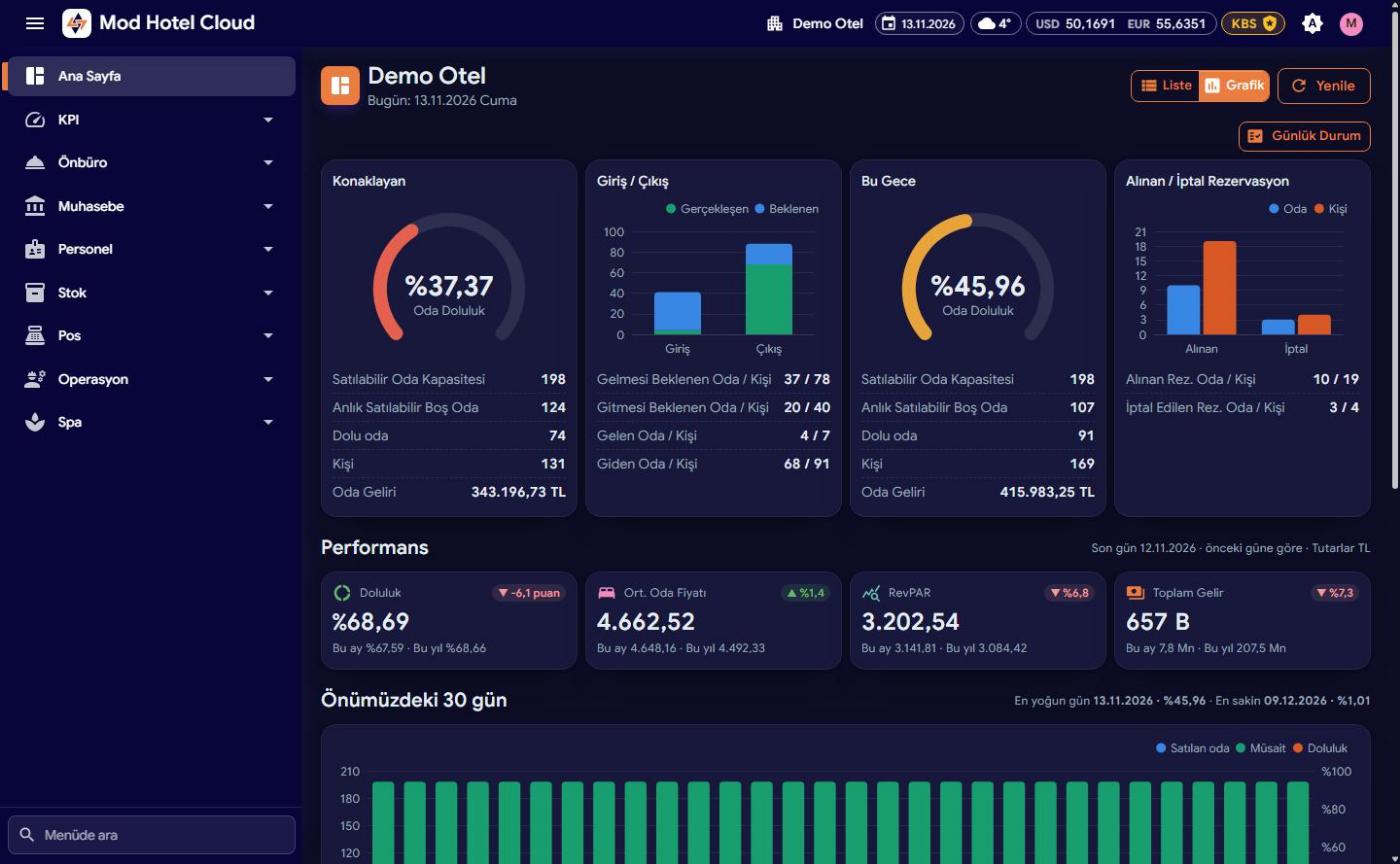
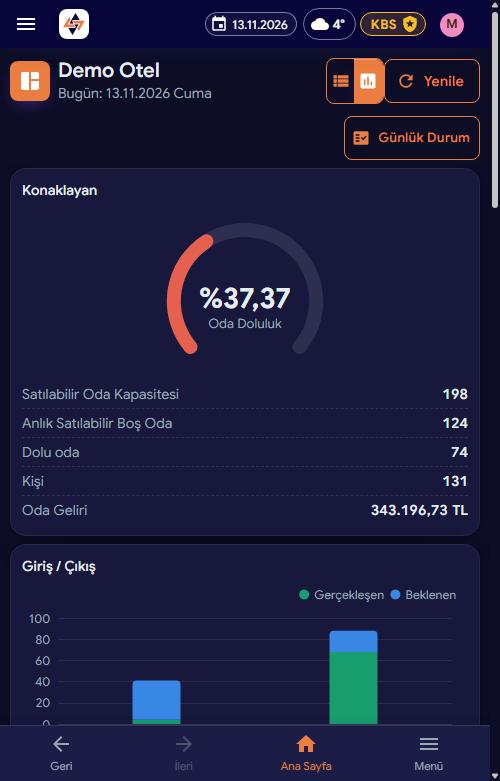
Mod Hotel Cloud is built for managers who need reports and statistics wherever they are. With AI-assisted analysis and KPI performance-evaluation reports, follow your hotel's pulse live from the browser or your phone and make the right call at the right time.
In-house, tonight, arrivals/departures and the next 30 days on one screen.
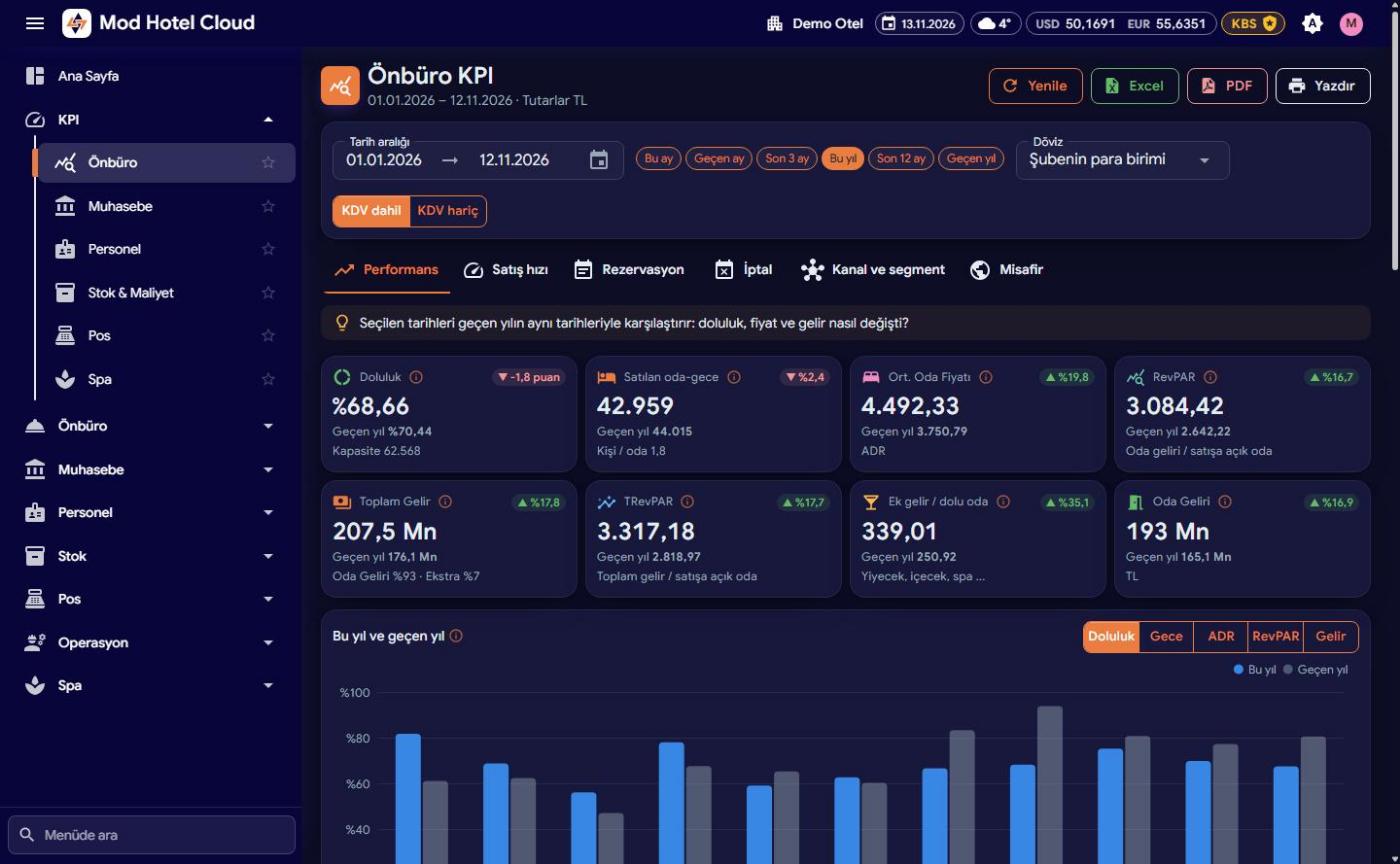
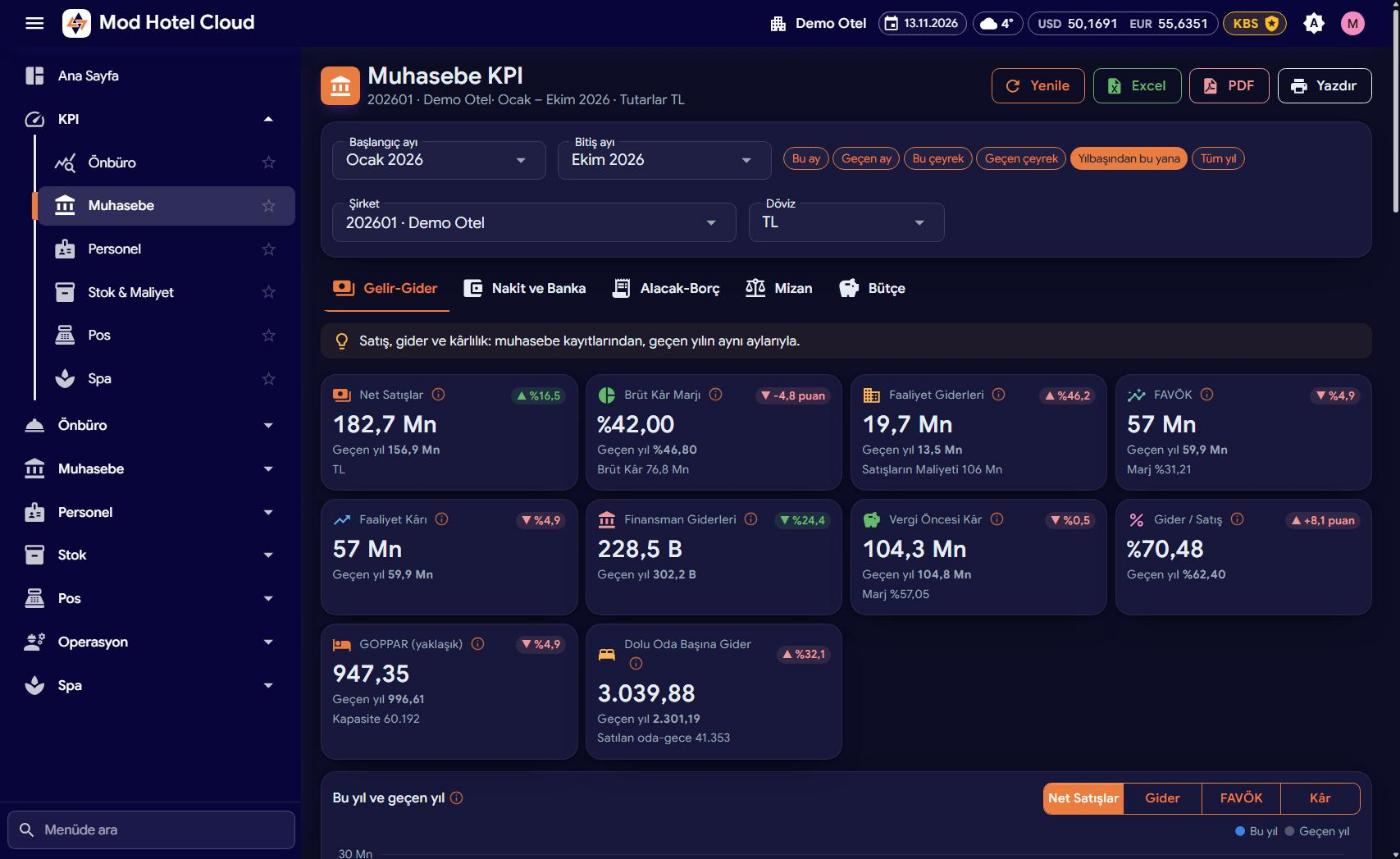
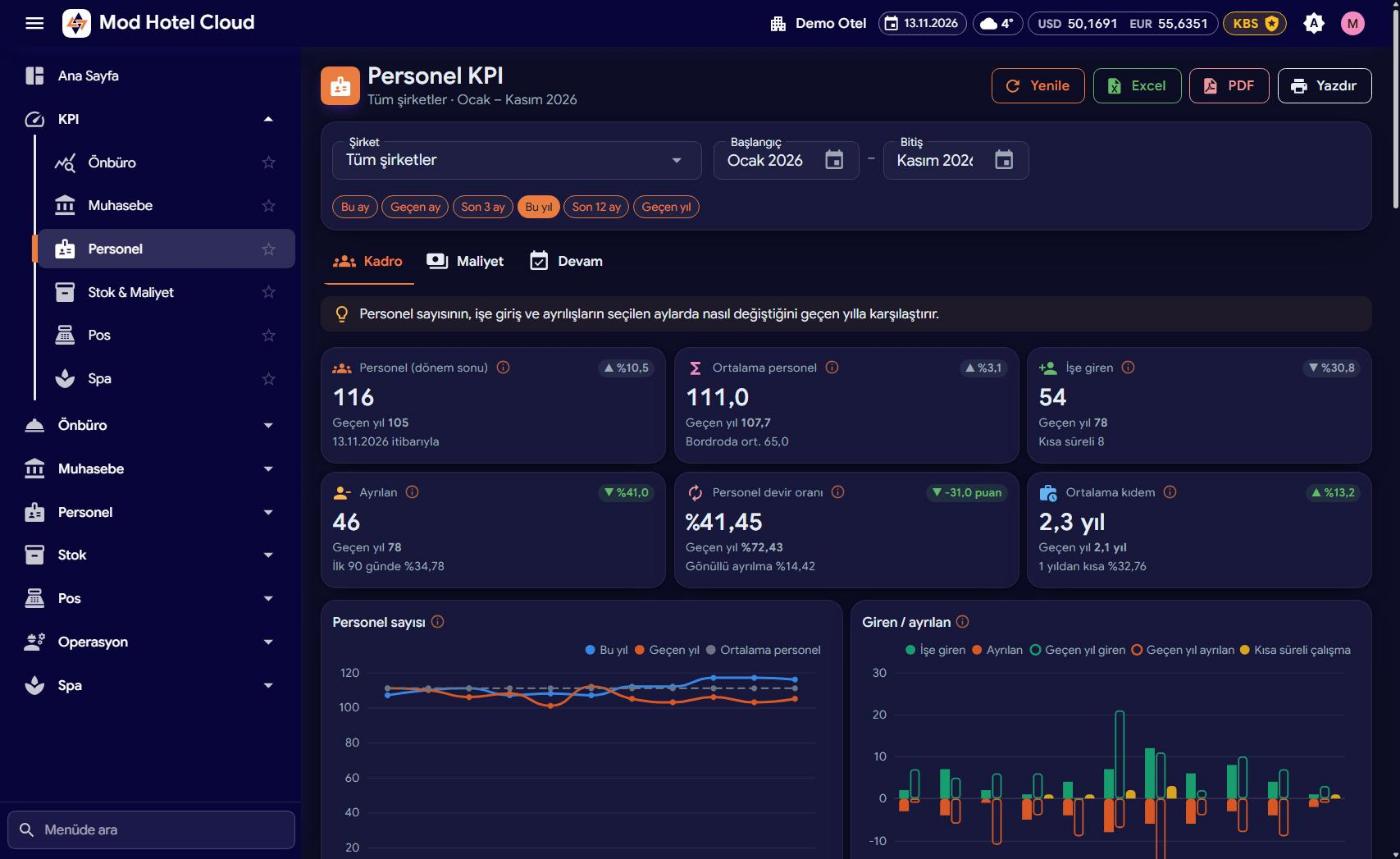
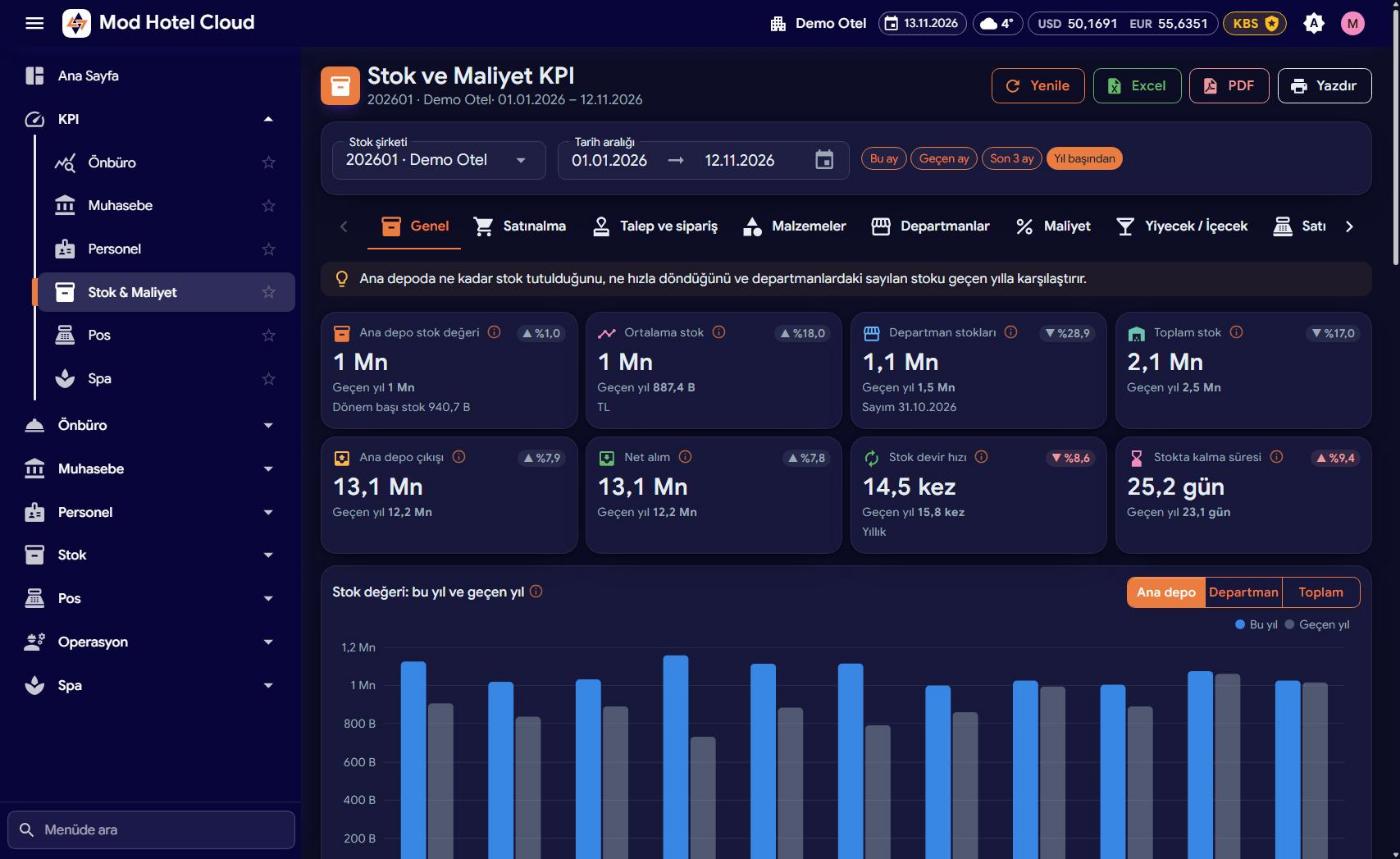
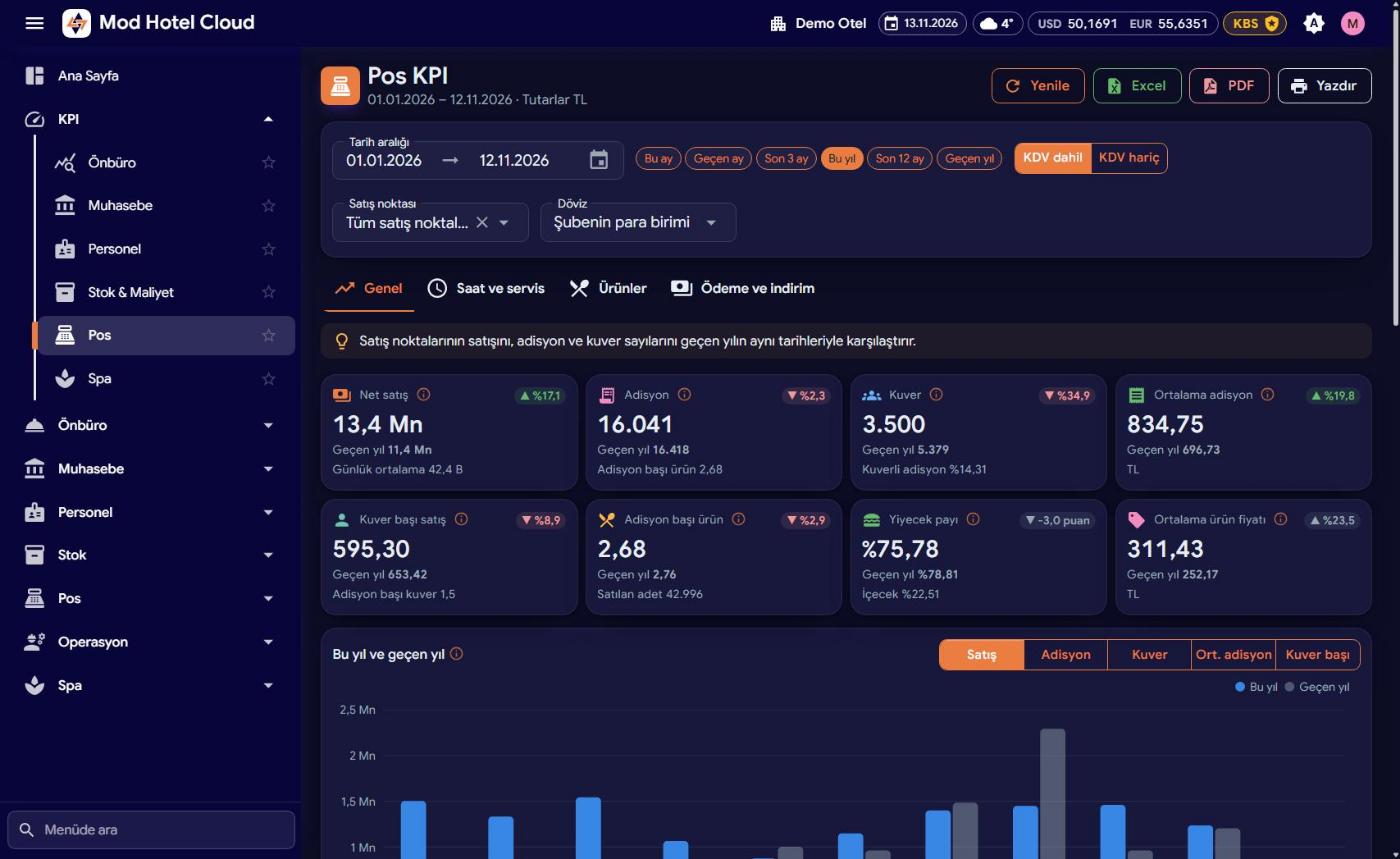
AI-assisted analysis; front office, accounting, staff, stock, POS and Spa KPIs, forecasts and manager reports. Excel, PDF and print.
Room status by floor, room plan by date, folio and folio history views.
Change room status, log faults and guest requests, post minibar and run a fault display board.
Work orders with photos, purchase and store-request approvals, budget entries.
Reservations, therapist calendar, Spa POS, packages and memberships.
One sign-in for every property; consolidated KPIs and side-by-side comparison.
MOD user rights, personal-data masking, audit trail and HTTPS.
Installable on your phone (PWA), push notifications, dark/light theme and multi-language support.
From boutique hotels to international chains, from city hotels to resorts — a few of our references.

















From PBX to door locks, from channel managers to ERP software — MOD talks to every system in your hotel.
Choose a category to see the brands.





MOD Hotel Software works mainly with leader-hotels in tourism industry. Over the years, working with specialists and qualified high-level personnel, our company provides professional services 7/24. In order to get the maximum level success of products offered to the last user, besides the software our company provides consulting services.
MOD Hotel Software corporately and scientifically caters for a lot of high level hotel managements, financial consultants, and also in this list presents the Universities who conduct the test researchs. Our software is one of the biggest and eldest in tourism sector and left behind the brilliant 30 year old history, is a proof of confidence to our company. Created by the corporate organization the software MOD, provides continuous and long term guaranteed confidence.
MOD for Windows version is equipped by the latest innovations in terms of software technology. All reports, prepared by the Crystal Report technology, support lots of different formats, such as: Excel-Word, Outlook, Csv, html, PDF. Hence, users are given the opportunity to create and produce their own reports. Reports that will be generated from the system, will help company to choose the right solutions in the future direction.
With database security, data protection against viruses and automatic backup system, the loss of information is impossible. User's mistake is reduced to zero, the integration between the modules designed to reduce the operational load to minimum. With detailed authorization system, with ability to determine menu and program right for each users individually, only appropriate and authorized persons will be able to use the program. Besides, with the features of easy use, shortcut keys, fast educability of person and wide variety of reporting in program, it has a well designed and flexible structure. It has a very detaile d LOG system. All operations done by users can be looked through with all detail. All operations in the form of create, change or delete, are stored in LOG and can be looked through easily.
Due to wide use throughout Turkey and increased number of personnel who can use the program, the adaptation of new personnel to the program is provided in the shortest time.
We are in constant search of people with abilities, who want to join our team.
Are you looking for a comfortable, regular, long term job? We are also looking for a new employees with such features, who will join our team!?
If you think that you are at right address, please send your resume to this address aktif@modhotelsoftware.com
AKTİF BİLGİ İŞLEM SAN.TİC.LTD.ŞTİ.
TR47 0004 6008 9203 6000 0439 96TR97 0004 6008 9200 1000 0439 95Reach us by phone or e-mail for a demo, a quote or support.
Çağlayan Mah. 2039/1 Sk. Bal Plaza K:4 D:9
Muratpaşa / ANTALYA
Antalya Corporate Tax Office / 0420018958

Babek avenue, Khatai district
Baku / Azerbaijan